Centuri's register with 128 up-to-date entries, including a depot, an electric bus and a supplier, linked to risks and requirements

Register management for regulated industries

Register management that gives you one version of the truth

Centuri's register management brings your organisation's master data, such as suppliers, equipment and chemicals, into one place and links it directly to cases, contracts and documents. Hosted in Sweden.

  • Your own registers, from simple lists to multiple levels
  • Linked to contracts, cases, risks and competences

Last updated: 4 November 2026

Market-leading customer satisfaction according to Business With 2026

Capio logotype
Aleris logotype
Agra logotype
Arla logotype
Polarbröd logotype
Region Jämtland Härjedalen logotype
Karolinska Universitetssjukhuset logotype
Destination Gotland logotype
Attendo logotype
Coop logotype
Peab logotype
Folkhälsomyndigheten logotype
Uddeholm logotype
Kiwa logotype
Transdev logotype

Why a system for registers

What is register management?

Register management means keeping your organisation's master data, such as suppliers, equipment and contacts, in one place so it can be reused without being duplicated. With a system in place, you get three things:

Data is entered once

The same supplier or contact exists in one place, instead of in several lists.

Everyone knows what applies

There is one current version of each record, and only authorised users can change it.

The connections stay intact

You see every contract, non-conformance and risk linked to a supplier.

How does register management work in Centuri?

You set up a register in four steps in Centuri, without consultants or code.
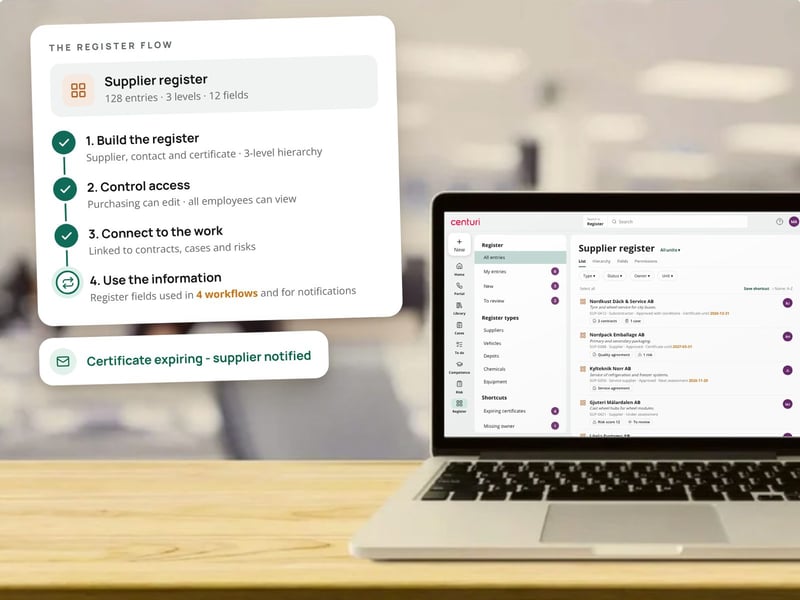
  1. Build the register – Choose which fields to include, from a simple list to a hierarchy with several levels.
  2. Control access – Decide which users or groups can view, add, edit or delete records.
  3. Link it to your work – Link the register to contracts, cases, risks and competences, so records are selected from a list.
  4. Use the information – Register fields are reused in workflows, and email fields can be used for notifications.
A laptop showing Centuri's supplier register, where the register has been built, given access rights and linked to contracts, cases and risks, and the supplier is notified when a certificate is expiring

Master data that works across the whole system

Flexible registers

Centuri lets you build your own registers, from simple lists to hierarchies with several levels · Custom fields and metadata · Relationships between parent and child levels

Linked to your work

Centuri links register fields directly to contracts, cases, risks and competences · Information is reused without duplicates · Email fields for notifications

Full control

Centuri controls access per register and per field, so only authorised users can change the data · Permissions per user or group · No separate login

Registers with AI

Validate and enrich data as it is entered

Centuri AI summarises content and lets you search using natural questions. You can also start AI activities in a workflow, for example to check and complete register data as it is entered.
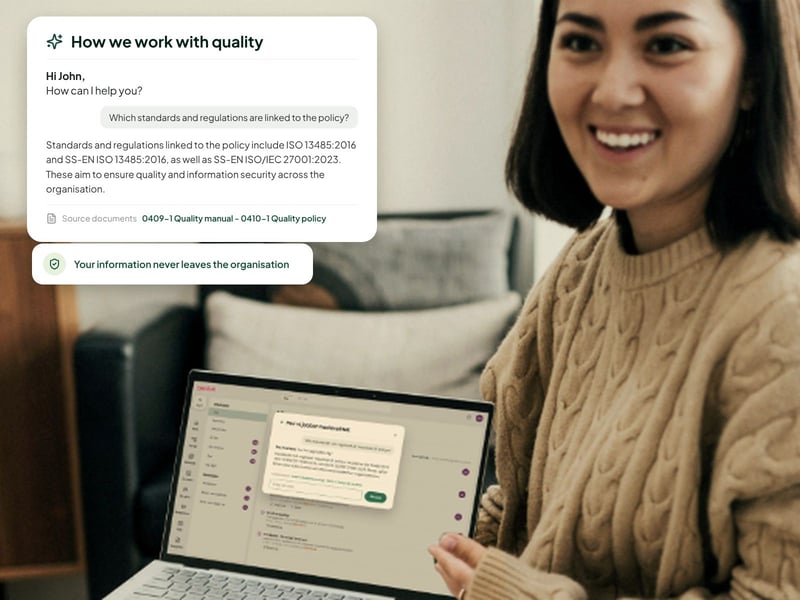

A smiling woman with a laptop, where Centuri AI answers a question about standards and cites its sources

Previously, information was spread across different systems … With Centuri, we now have one platform where up-to-date information is always available - in one place.

Robin JonsénQEHS Business Partner, Foodmark (Agra)

AGRA CASE STUDY

Up-to-date information in three countries, in one system

Challenge: At Agra, information was spread across different systems, and finding the right information took far too long. The company needed a system it could share with its sister companies in Denmark and Norway.

Result: An integration from the ERP system gives employees the right data directly in Centuri, and they can trust that it is up to date.

3 countries

with one shared system: Sweden, Denmark and Norway (Agra, 2026)

Show us your register, and we'll show you the connections

A woman waving in a video call from her laptop

Why quality managers choose Centuri

Compare Centuri with: SharePoint · CANEA · Addsystems · AM System

Icon showing a puzzle piece

Make changes yourself, without consultants

Centuri is no-code. You build workflows, forms and templates yourself instead of buying consultancy hours.

Icon showing sparkling stars

AI across the whole platform

Centuri AI summarises, analyses and answers based on your own approved information, in every module.

Icon showing a shield with a tick

Hosted and stored in Sweden

The platform runs in Sweden, without exposure to the US CLOUD Act. Your data never leaves the EU/EEA.

Icon showing an award

Customers who stay

Market-leading customer satisfaction according to Business With 2026. Aleris has been a customer for 20 years.

Questions about register management

What is the register function in Centuri used for?

The register function handles structured data and lists in your organisation, such as suppliers, equipment and assets, chemicals, contacts, and permits and authorisations. The data sits in one place and can be reused in contracts, cases, risks and competences, instead of being entered in several places.

Can registers be linked to documents and cases?

Yes. A register can be linked to documents, cases, risks, competences and contracts. This makes it easier to categorise information and see connections, for example every non-conformance, risk assessment and contract linked to a particular supplier. You no longer need to search several systems to get the full picture.

What kind of data suits the register module?

The register module suits structured reference data that you want to maintain, search and link. Common examples are supplier registers, equipment and asset registers, chemical registers, contact registers and registers of permits and authorisations.

Who can change the data in a register?

You decide which users or groups can work with a particular register. Access can be controlled per register and per field, so only authorised users can add, edit or delete information. Everyone else sees the data they need, and every change is traceable.

See how Centuri brings your master data together

Here's what happens when you book a demo.

1. Book a time – Choose a time that suits you. The demo takes 30 minutes.

2. See Centuri for your needs – We show you the parts of the platform that meet your needs.

3. Get a proposal – You receive pricing and a plan for getting started. Initial implementation takes 4–8 weeks.

More than one module, in one platform

Icon for document control

Document control

Control documents with versions, approvals and read acknowledgements.

Icon showing a flip chart

Non-conformance management

Report, investigate and resolve non-conformances with full traceability.

Icon showing a flip chart

Case management

Handle audits, customer cases and other matters in automated workflows.

Icon for risk management

Risk management

Assess risks in a risk matrix and link them to actions.

Icon for process mapping

Process mapping

Draw process maps and link them to governing documents.

Icon showing a graduation cap

Training management

Map competences and follow up on training.

Icon for contract management

Contract management

Keep your contracts in one place and stay on top of key dates.