Process mapping for regulated industries

Process mapping software that lives in your management system

Centuri is process mapping software built with 2c8. Map your processes once and link them to documents, risks and executable processes. Changes update everywhere automatically.

  • Link documents and risks directly in the map
  • See your organisation from several perspectives

Last updated: 4 November 2026

Market-leading customer satisfaction according to Business With 2026

Capio logotype
Aleris logotype
Agra logotype
Arla logotype
Polarbröd logotype
Region Jämtland Härjedalen logotype
Karolinska Universitetssjukhuset logotype
Destination Gotland logotype
Attendo logotype
Coop logotype
Peab logotype
Folkhälsomyndigheten logotype
Uddeholm logotype
Kiwa logotype
Transdev logotype
Almondy logotype
Doktor.se logotype
Nobina logotype
Praktikertjänst logotype
Region Blekinge logotype
RISE logotype
Sweco logotype
Västanhede logotype

Why a process mapping tool

What is process mapping?

Process mapping describes how your organisation's processes fit together, who does what, and which documents and risks belong to each step. With a shared tool, you get three things:

Everyone maps the same way

Built-in method support means the same symbols are used for the same thing across the whole organisation.

Change it in one place

Each object exists only once, so a change carries through to every map where it is used.

One shared picture

Processes are reviewed and approved, so everyone shares the same picture of how the work is done.

How does process mapping work in Centuri?

A process is created in four steps in Centuri and 2c8, from first sketch to published map.
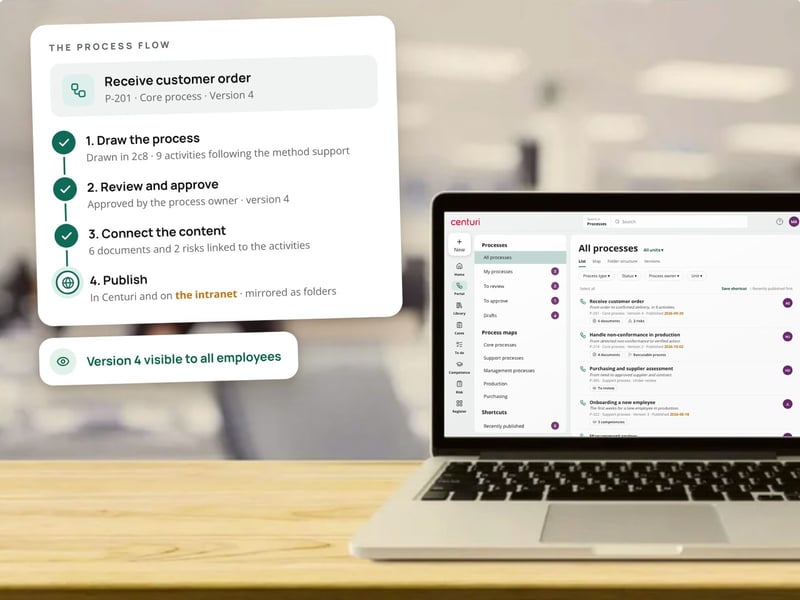
  1. Map the process – Draw it in 2c8 with built-in method support, so everyone uses the objects in the same way.
  2. Review and approve – The process is reviewed and approved in a workflow, with version control.
  3. Link the content – Drag in documents from Centuri and link activities to risks and executable processes.
  4. Publish – Publish the map in Centuri or on your intranet. It is also mirrored as a folder structure.
A laptop showing all processes in Centuri, next to the process flow for a customer order from drawing in 2c8 to publishing for all employees

Processes that guide day-to-day work

Map consistently and share responsibility

Centuri and 2c8 provide built-in method support, so everyone in the organisation maps processes the same way · Review and approval · Version control

Link what belongs together

Centuri links process activities directly to documents, risks and executable processes · Drag-and-drop documents · Links to external systems

Multiple perspectives

Centuri shows your organisation as processes, organisation, requirements, RASCI or information model · Change once, update everywhere · Publish in Centuri or on your intranet

Process mapping with AI

Find the right procedure with one question

With Centuri AI, employees can ask questions in plain language and get answers from the documents and procedures linked to your processes. Answers are based only on your own approved information.
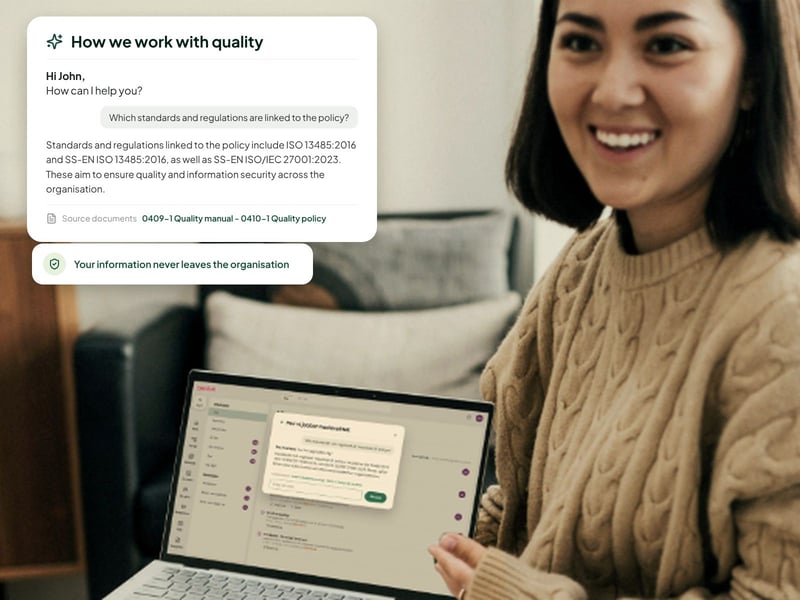

A smiling woman with a laptop, where Centuri AI answers a question about standards and cites its sources

Today we have a clear overview, better traceability and everything in order … It's like having tidied your desk - everything is where it should be, and we can focus on what matters most: our patients and residents.

Christina JanssonQuality, Environment and Information Security Manager, Stockholms Sjukhem

Want to see your processes in Centuri?

A woman waving in a video call from her laptop

Why quality managers choose Centuri

Compare Centuri with: SharePoint · CANEA · Addsystems · AM System

Icon showing a puzzle piece

Make changes yourself, without consultants

Centuri is no-code. You build workflows, forms and templates yourself instead of buying consultancy hours.

Icon showing sparkling stars

AI across the whole platform

Centuri AI summarises, analyses and answers based on your own approved information, in every module.

Icon showing a shield with a tick

Hosted and stored in Sweden

The platform runs in Sweden, without exposure to the US CLOUD Act. Your data never leaves the EU/EEA.

Icon showing an award

Customers who stay

Market-leading customer satisfaction according to Business With 2026. Aleris has been a customer for 20 years.

Questions about process mapping

Why isn't a standard drawing tool enough?

A process drawn in a general-purpose drawing tool lives in isolation. It isn't linked to the documents, risks or executable processes it governs, and a change doesn't carry through to every place the process is used. With Centuri and 2c8, the process map is a living part of your management system.

Can governing documents be linked to processes?

Yes. Governing documents can be linked directly to processes, so anyone following a process always sees the right procedure, instruction or policy. You drag in documents from Centuri, and new documents can be linked as soon as they are created. When a document is updated, everyone sees the new version in the map.

Which tool does Centuri use for process mapping?

Centuri's process mapping is integrated with 2c8 Modeling Tool. Rather than building its own tool, Centuri has chosen a leading process mapping solution, with direct links to documents, cases and risks in Centuri. You get method support for both creating and maintaining your processes.

Do we need a separate tool alongside Centuri?

No. Process mapping with 2c8 is included in the platform, so you don't need a separate process mapping tool. Maps are published in Centuri or on your intranet and are also translated into a folder structure for people who prefer to search the traditional way.

Can we update the process maps ourselves?

Yes. Your own administrators update process maps directly in a no-code environment, without consultants or IT projects. Because each object exists only once, you change it in one place and every map where it is used is updated. Nobody has to hunt down old copies.

See how Centuri brings your processes to life

Here's what happens when you book a demo.

1. Book a time – Choose a time that suits you. The demo takes 30 minutes.

2. See Centuri for your needs – We show you the parts of the platform that meet your needs.

3. Get a proposal – You receive pricing and a plan for getting started. Initial implementation takes 4–8 weeks.

More than one module, in one platform

Icon for document control

Document control

Control documents with versions, approvals and read acknowledgements.

Icon showing a flip chart

Non-conformance management

Report, investigate and resolve non-conformances with full traceability.

Icon showing a flip chart

Case management

Handle audits, customer cases and other matters in automated workflows.

Icon for risk management

Risk management

Assess risks in a risk matrix and link them to actions.

Icon showing a graduation cap

Training management

Map competencies and follow up on training.

Icon for contract management

Contract management

Keep your contracts in one place and stay on top of key dates.

Icon showing four squares

Register management

Keep registers and structured data in one place.