Colleagues in an office with Centuri's integrations with Azure AD, business systems and Power BI

Integrations

Connect your systems, without double entry

Centuri's integrations connect the platform to the systems you already use, from Microsoft 365 and Azure AD to business systems and Power BI. Information is entered once and follows automatically wherever it is needed, without double entry.

  • Users synced from Azure AD
  • Data from your business system, straight into forms
  • Quality data in Power BI, without manual exports

Last updated: 21 October 2026

Market-leading customer satisfaction according to Business With 2026

Arla
Karolinska Universitetssjukhuset
Uddeholm
Transdev
Capio
Polarbröd
Sweco
Region Jämtland Härjedalen
Scandi Standard
Attendo
Nobina
Kiwa
Agra
Folkhälsomyndigheten
Peab
Doktor.se
Almondy
Destination Gotland
Aleris
RISE
Coop
Praktikertjänst
Västanhede
Region Blekinge

The challenge

What does it cost when your systems don't talk to each other?

Information silos

The same information sits in several systems, and nobody knows for sure which version is correct.

Double entry

Customer data, orders and employee details are typed in by hand in several systems, with a risk of error every time.

Unclear ownership

Employees don't know whether a task belongs in Centuri, in the business system or in a spreadsheet.

How it works
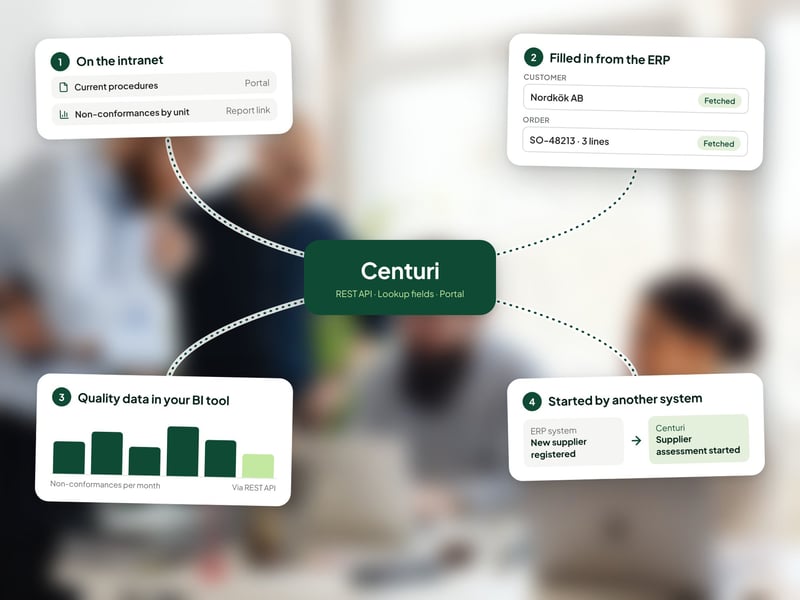
Four ways to connect Centuri to your systems

  1. Publish where your people already work. Procedures and reports from Centuri are shown on the intranet via a portal or a report link, so employees find them where they already work.
  2. Data that fills itself in. Lookup fields pull data from your business system into forms, for example customer data and order lines in a complaint.
  3. REST API for analysis. Pull data from Centuri into a data warehouse or BI tools such as Power BI, and follow up your quality work alongside other business data.
  4. Workflows started from other systems. Your other systems can trigger steps in a Centuri workflow via the API, without anyone moving information by hand.
Centuri at the centre, connected to the intranet, the business system, the BI tool and a workflow started from another system

Does Centuri work with your systems?

Centuri has a REST API and ready-made integrations with common systems. How much of the API is included depends on which package you choose.

Microsoft 365 and Azure AD

Users are synced from Azure AD, and Centuri connects to Word, Excel, Teams and Outlook, where your people already work.

Business and finance systems

Customer data and order lines are pulled into cases and forms, so nothing is entered twice.

Power BI and other BI tools

Follow up non-conformances, risks and processes in your BI tool, alongside other business data.

2c8

Link your process maps in 2c8 to the procedures and documents in Centuri.

Why organisations choose Centuri

Compare Centuri with: SharePoint · CANEA · Addsystems · AM System

Make changes yourself, without consultants

Centuri is no-code. You build workflows, forms and templates yourself instead of buying consultancy hours.

AI across the whole platform

Centuri AI summarises, analyses and answers based on your own approved information, in every module.

Hosted and stored in Sweden

The platform runs in Sweden, without exposure to the US CLOUD Act. Your data never leaves the EU/EEA.

Customers who stay

Market-leading customer satisfaction according to Business With 2026. Aleris has been a customer for 20 years.

Questions about integrations

Which systems can be integrated with Centuri?

Centuri has a REST API, so the platform can be connected to your other systems. Common integrations include Microsoft 365 with Teams and Outlook, user sync from Azure AD, business and finance systems, Power BI and other BI tools, and the process tool 2c8. How much of the API is included depends on which package you choose. If your system isn't listed here, we'll go through the options in the demo.

Does setting up an integration require programming?

No, not to get started. Centuri sets up the integrations together with you, for example the user sync from Azure AD, so you don't need to configure them yourselves. If you want to build your own solution on the API, such as a connection to an internal system, this is done by a developer in your organisation or at a partner.

Can data be synced automatically with other systems?

Yes. Users are synced automatically from Azure AD, so new employees and changed roles appear in Centuri without manual work. Through the API, your other systems can also send information to Centuri and trigger steps in a workflow, and data from Centuri can be pulled into data warehouses and BI tools. That way, nobody has to enter the same information twice.

Does Centuri work with our BI tool?

Yes. Data on non-conformances, risks and processes can be pulled from Centuri via the REST API into a data warehouse or BI tools such as Power BI. There, your quality data appears in reports and dashboards alongside other business data, without manual exports. This makes it easier to see how quality work connects with the rest of the business.

Can Centuri pull data from our business system into a form?

Yes. With lookup fields, a form in Centuri can fetch details directly from your business system, for example customer data and order lines when a complaint is registered. The details are fetched instead of typed in by hand, which saves time and reduces the risk of errors in the case.

See how Centuri works with your systems

Here's what happens when you book a demo.

1. Book a time. Choose a time that suits you. The demo takes 30 minutes.

2. See Centuri for your needs. We show you the parts of the platform that meet your needs.

3. Get a proposal. You receive pricing and a plan for getting started. Initial implementation takes 4-8 weeks.

More than one module, in one platform

Document control

Control documents with versions, approvals and read acknowledgements.

Non-conformance management

Report, investigate and resolve non-conformances with full traceability.

Case management

Handle audits, customer cases and other matters in automated workflows.

Risk management

Assess risks in a risk matrix and link them to actions.

Process mapping

Draw process maps and link them to governing documents.

Training management

Map competences and follow up on training.

Contract management

Keep contracts in one place and stay on top of key dates.

Register management

Keep registers and structured data in one place.